For shops and small factories

One job, end to end

This page follows a single kitchen through the whole shop — the same way Panelwright does. Nothing below is a plan or a roadmap item; it is what the extension does today.

Day 0 · once, before the first job

Teach it your shop

An afternoon of set-up, and every job afterwards inherits it. This is what makes the difference between a cut-list plugin and a system.

Material database

Every board you buy: name, matching rule, price per sheet, sheet formats (more than one per material), grain direction, cutting cost per sheet, edge-band cost per metre. Edge bands with their own prices. Panelwright picks the cheapest format that fits the job and never rotates a grain-marked part.

Hardware catalogue

Hinges, slides, handles, legs, rails, lifts and connectors from Blum, Hettich, Häfele, Grass and Salice, with cup diameter and depth, plate pattern, slide lengths and prices. Add your own items, your own prices, and even your own .skp model so a part looks right in 3D.

Shop standard

Joinery — confirmat, Minifix, dowel, Cabineo or Domino — plus door gaps, plinth height and recess, back-panel thickness, minimum banding thickness, kerf, margins, drilling rules, and your labour, cutting, banding, CNC and assembly rates. Set once; every cabinet and every price follows it.

Company and templates

Your logo, company and bank details, tax ID, terms, warranty, lead time and payment split; A4 or Letter; the language documents come out in. Ready-made cabinet templates for the sizes you build most, so a designer places a module instead of filling a form.
Step 1 · the designer

Model in the morning

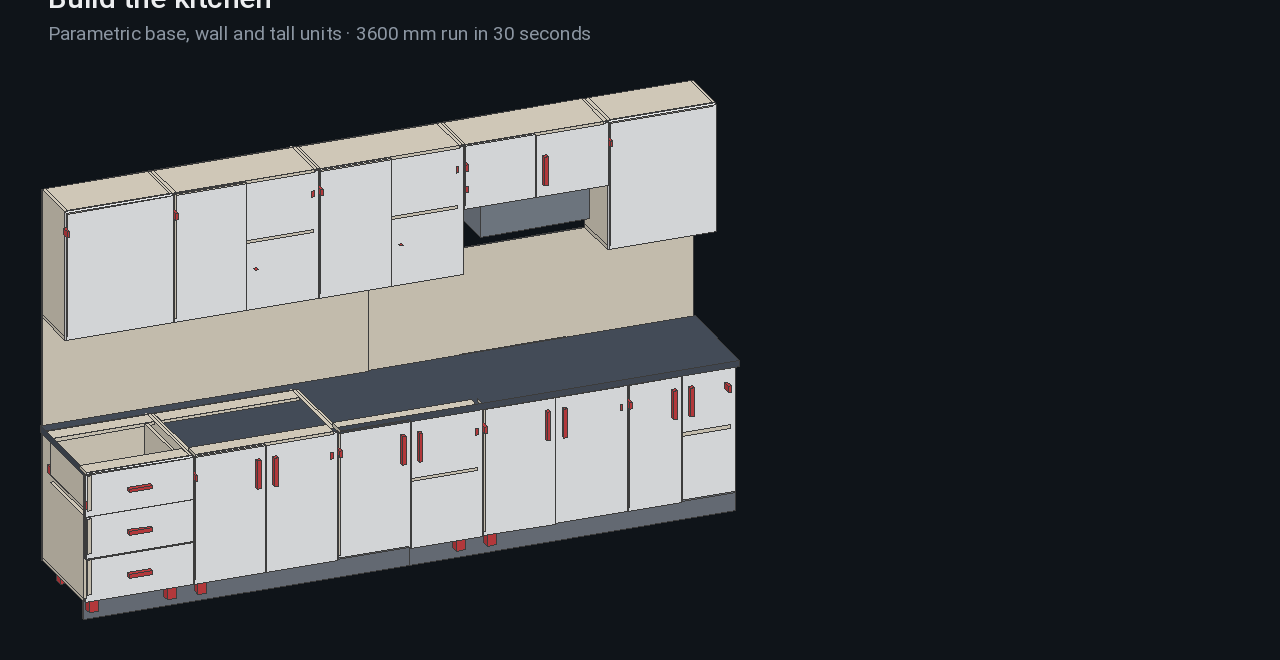
Generate cabinets and whole runs from wall lengths, drop in templates, or draw freely — Panelwright reads any group or component. Parts are named, so the cut list, drilling, hardware and costing all know what each panel is.

Marks can be shown on screen — part numbers, sizes, banded edges in red — without adding a single line of geometry to the model.

28 typesI / L / U runstemplate libraryeditable after placingglass & framed doorsunfolds curved panels
Kitchen run in SketchUp
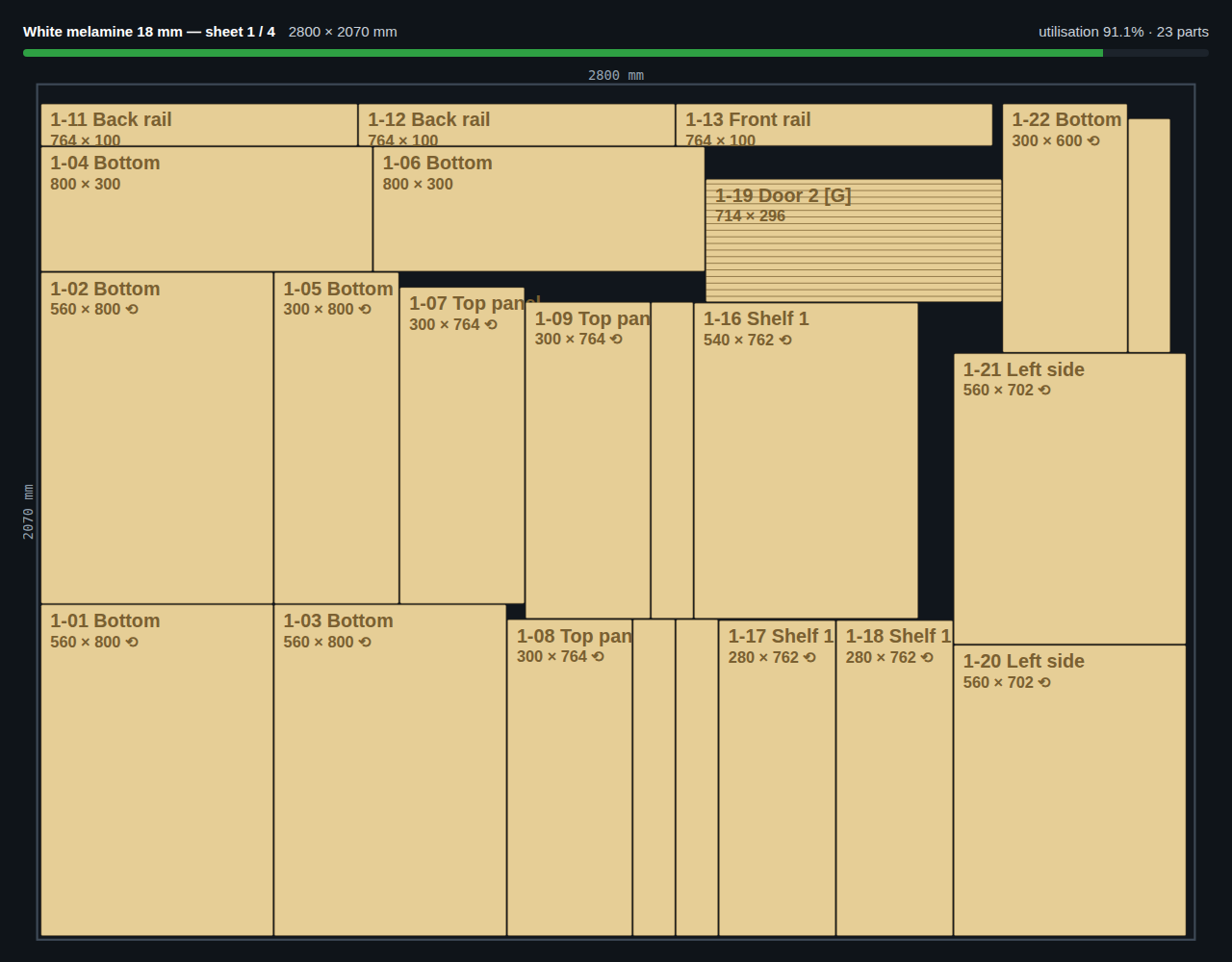
Nesting result
Step 2 · one button

Calculate

Parts are aggregated with their edge codes and grain. Sheets are nested per material and thickness — offcuts from earlier jobs first, then the cheapest new format — with kerf and margins. Hardware is counted from the model and named with brand, model and size, ready to order. Joinery connectors are counted from the joints themselves. Costing runs across materials, waste, banding, hardware, cutting, CNC, assembly, transport, margin and tax.

Then the model check runs: parts bigger than the sheet, non-standard slide lengths, doors too wide for their hinges, missing materials, generic hardware names. It is cheaper to read a warning than to re-cut a door.

Step 3 · the shop floor

What the cutter, the driller and the assembler each get

Cutting

Sheet layouts with utilisation per sheet, part numbers on every piece, DXF per sheet or per part for the beam saw or the router, and true contours for round and shaped parts.

Drilling

System 32 drawings per part with every hole dimensioned from the corner: 35 mm hinge cups, plate screws, Ø5 shelf rows on a 32 mm pitch, and confirmat, Minifix or dowel holes to match your joinery. PDF for a manual driller, DXF for CNC.

Banding & labels

Banding metres per material and per part, with the L1/L2/W1/W2 code on each label. Labels carry the part number, size, material, edges and a barcode — one per row or one per piece.

Assembly

Assembly sheets per unit with 3D views and part numbers, plus a hardware bag list and packing list so a unit leaves the shop complete.

Shop packet

A single HTML file with the cut list, sheet layouts, banding, hardware and assembly — opens on any phone or tablet on the floor, with no internet and no app.

Nothing hand-written

Every one of these carries the same part numbers, so a question on the floor is answered by pointing at a number, not by re-measuring.

Step 4 · materials

Stock, offcuts and the order you actually need

Stock with minimum levels

Sheets, edge banding and hardware are registered with quantities and a minimum. Anything under the minimum is flagged.

Deducted on confirmation

Confirm a job and its materials leave stock automatically. A ledger guarantees one job is deducted once; if stock will not cover it you are warned and can continue anyway.

Purchase order PDF

What the job needs minus what you hold becomes an order for the supplier — with your company header, quantities and prices.

Offcut store

Usable leftovers from every job are registered with their size and material and are nested first on the next job, before any new sheet is opened.

Packing lists

Per unit: which hardware goes in which bag, which parts belong to which cabinet. Fewer second trips to site.

Variant comparison

Same drawing, different material or hardware — see all three prices side by side before you order anything.

Step 5 · the client

Quote in the meeting, invoice the same day

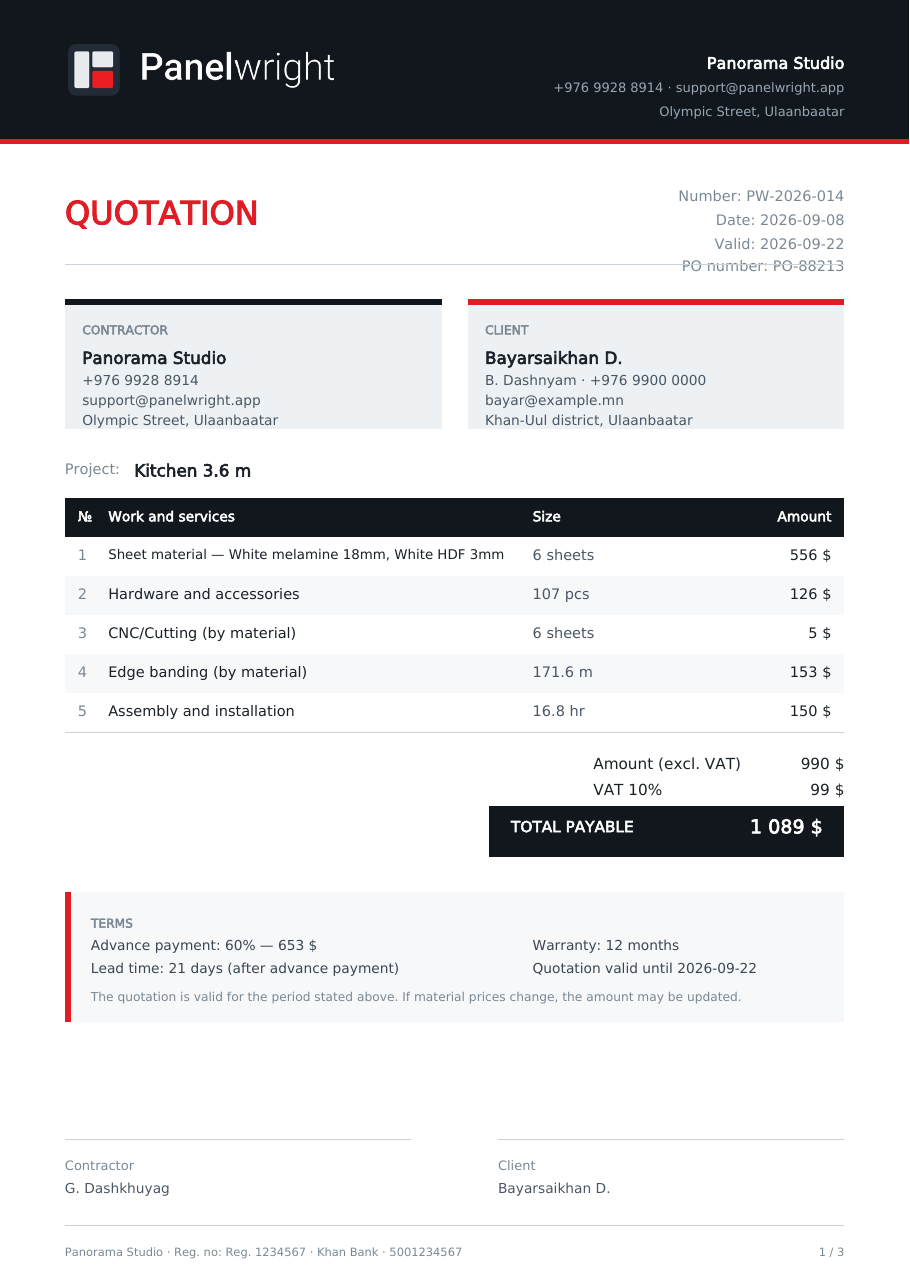
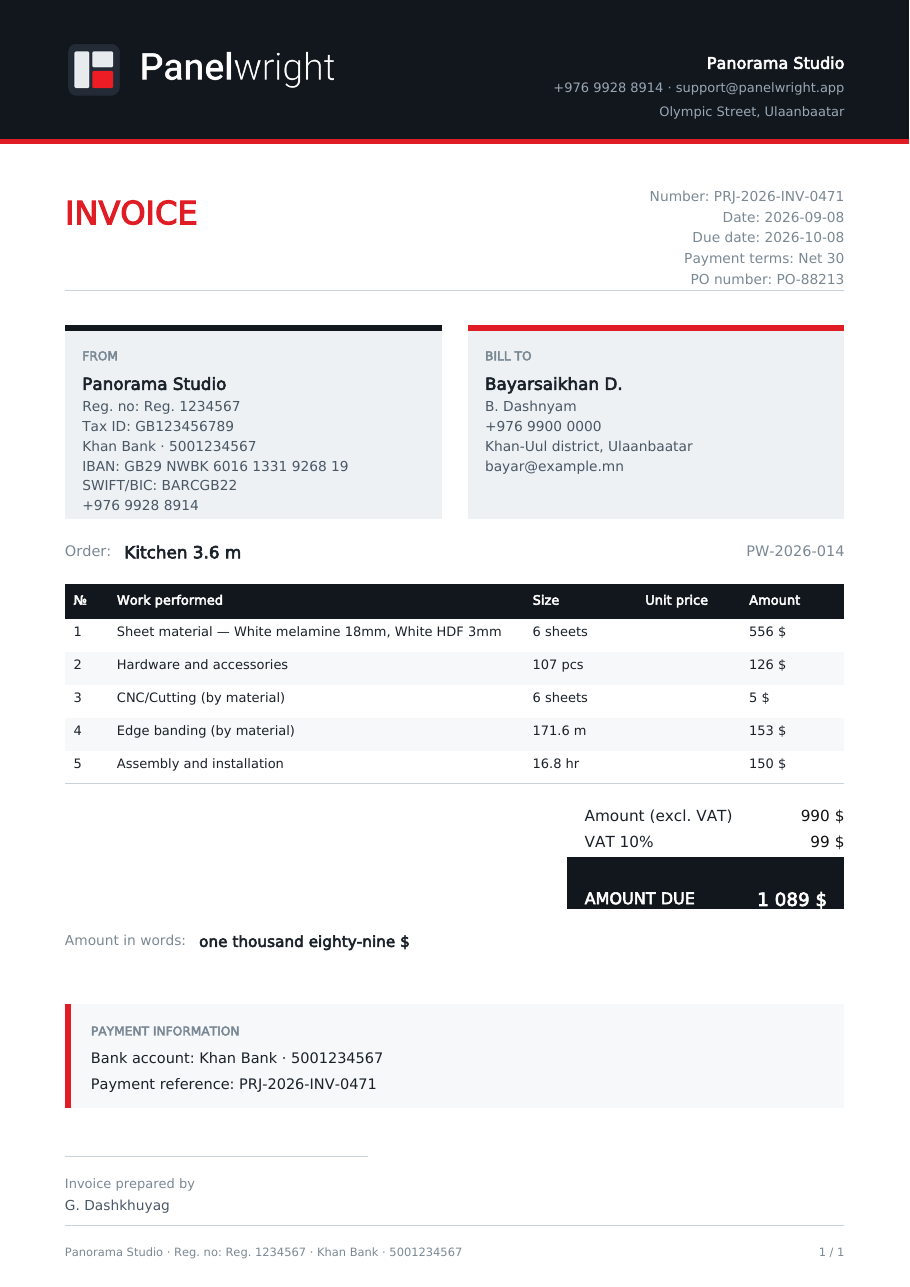
Four quotation layouts — detailed, summary, by zone or by cabinet — plus a design-project quote with a printable measurement sheet. Advance percentage, lead time, warranty and validity come from your settings. When the job is agreed, the invoice is the same numbers with FROM / BILL TO, tax ID, IBAN / SWIFT, PO number and Net-30 terms; the contract comes as PDF and as an editable Word file.

An e-mail draft opens with the documents already attached, in the client's language.

Quotation PDF
Invoice PDF
Step 6 · after the job

Did it actually make money?

The part most shops never close. Panelwright keeps the plan, you enter the reality, and it shows you the gap.

Archive and MASTER file

Every job gets a project code and its own folder structure. Archived jobs are collected into one MASTER Excel file — every job, its materials, hardware, hours and totals in one sheet you can filter, chart or hand to an accountant.

Planned versus actual

When the job was archived, the plan was frozen. Afterwards you enter what really happened: sheets used, hardware bought, hours worked, extra costs, the price you actually received. The report shows the difference line by line — where the estimate was wrong and by how much.

Backup and restore

One file holds prices, hardware, company and client data, the project archive, the offcut store and every setting. It is written automatically before a reset or a restore, so a mis-click never costs you a year of price work.

A team on one folder

Point several seats at one shared folder — network drive, local server or a synced folder. File locking, atomic writes and re-read-merge mean two people saving at the same moment cannot lose each other's changes.

Being straight with you

What it is not

Not a factory MRP. There is no machine scheduling, no shift planning, no barcode terminals on the line and no multi-site server. If you run three shifts on a Homag line, this is not your production planner.

Not an accounting system. It writes invoices and tracks job profit; it does not file your tax return or talk to your accounting software. The MASTER Excel file is what your accountant gets.

Not a cloud service. No account, no sync, no web dashboard. That is deliberate — your prices and clients stay on your disk — but it also means sharing between offices is your network's job, not ours.

It is the complete working system for a one- to twenty-person cabinet shop: design, production, materials, paperwork and money, sharing one set of data, inside the program your designer already uses.

Run one real job through it

Ten days, every feature, no card. Model a kitchen you have already built and compare the numbers with what it actually cost you.